The SWIPE method
The basic CLOCK SWIPE method
First of all, this swipe method is the idea of Paul Longhurst, who was kind enough to let me implement it into TimeSmith.
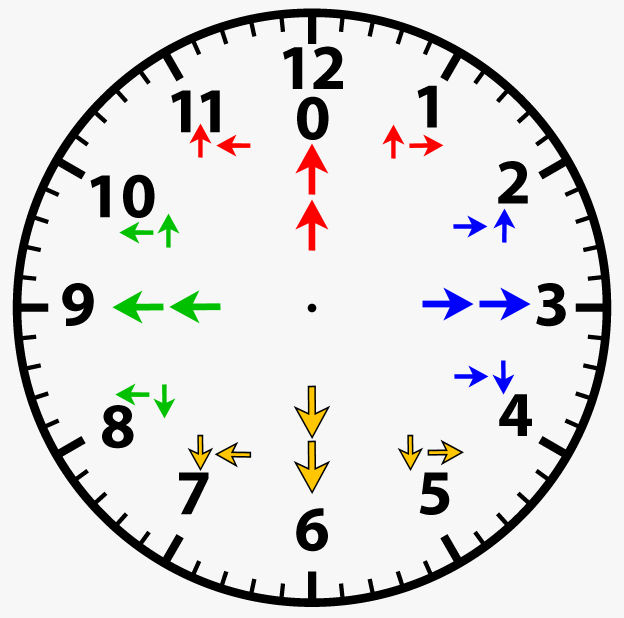
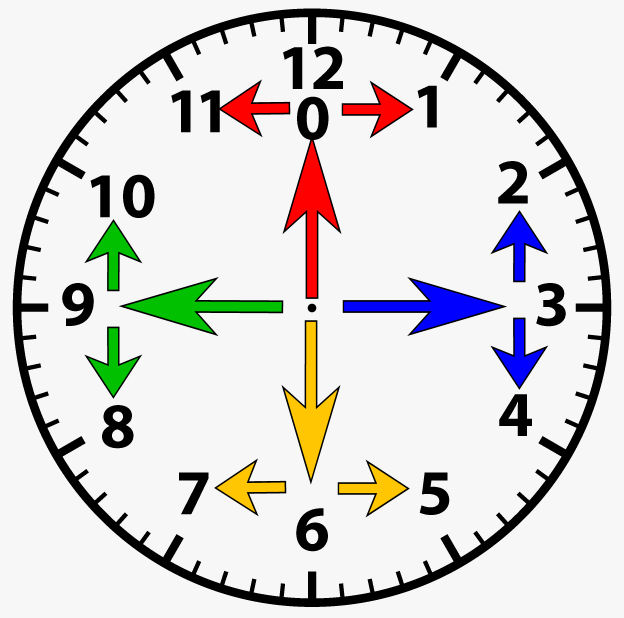
The idea of the clock swipe method is that you can input any number with exactly 2 swipes. For this you'll have to imagine a clock face with numbers 1 to 12 (where number 12 can also represent number 0). You will have to swipe the screen of your phone (or push the buttons of your 4-button BT remote) to any of these 4 directions: UP, DOWN, LEFT or RIGHT.
Here is a video where I'm explaining how to swipe to any of the 12 numbers:
The first swipe
- if the first swipe is UP, you go to number 0/12
- if the first swipe is RIGHT, you go to number 3
- if the first swipe is DOWN, you go to number 6
- if the first swipe is LEFT, you go to number 9
The second swipe
- if the first swipe was UP, and your second swipe is UP again, then you stay on number 0/12
- if the first swipe was UP, and your second swipe is RIGHT, then you go to number 1
-
if the first swipe was UP, and your second swipe is LEFT, then you go to number 11
-
if the first swipe was RIGHT, and your second swipe is RIGHT again, then you stay on number 3
- if the first swipe was RIGHT, and your second swipe is UP, then you go to number 2
-
if the first swipe was RIGHT, and your second swipe is DOWN, then you go to number 4
-
if the first swipe was DOWN, and your second swipe is DOWN again, then you stay on number 6
- if the first swipe was DOWN, and your second swipe is RIGHT, then you go to number 5
-
if the first swipe was DOWN, and your second swipe is LEFT, then you go to number 7
-
if the first swipe was LEFT, and your second swipe is LEFT again, then you stay on number 9
- if the first swipe was LEFT, and your second swipe is UP, then you go to number 10
- if the first swipe was LEFT, and your second swipe is DOWN, then you go to number 8
Please click on the thumbnails to view the images: